MovementHound - You might be missing something, move it!

During my deep dive into the minimal rights required for various lateral movement techniques, I realized that many of these requirements could be streamlined. To address them properly, I initially wrote several standalone PowerShell scripts (Find‑SCMAccess, Find‑DCOMLocalAdminAccess, Invoke‑GhostTaskScan, and others). Eventually, I decided to consolidate all of them, including the ones that already existed, into a single unified script.
Switching the name to PersistenceHound was a legitimate option, but I preferred to keep it as is, since its primary use is still lateral movement during assessments.
Enumeration is the key
This post focuses on highlighting the lateral movement techniques/minimal rights requirements that the script enumerates, specifically those that tend to be overlooked during assessments. Common or well‑known techniques will not be listed here, even though they are included in the script. If you’re interested in the technical details or want to review the full list of techniques covered, you can refer back to the previous posts.
- Service creation (bypassing
OpenServicecall) with an SCM access mask of0x0003 (SC_MANAGER_CREATE_SERVICE + SC_MANAGER_CONNECT). - Service reconfiguration with an SCM access mask of
0x0001 (SC_MANAGER_CONNECT)plus a service access mask of0x0002 (SERVICE_CHANGE_CONFIG). - WMI over WSMAN (“WMIMAN”).
- Remote Registry keys.
- RDP shadow with an RDP-Tcp/console access mask of
0x00011 (WINSTATION_QUERY + WINSTATION_SHADOW). - SSH with Plink fallback support (including
GSS‑API). - WinRM RootSDDL.
Reliability over OPSEC
Since the tool was designed primarily for controlled environments and legitimate assessments, its approach is intentionally oriented toward active enumeration whenever other, more discreet options are not available. In certain types of assessments, sacrificing stealth and OPSEC is not only acceptable but necessary to obtain reliable and unambiguous results. As discussed in the previous posts, enumerating lateral movement capabilities based solely on group membership does not yield reliable results. Classic examples include:
- The
ExecuteDCOMedge in BloodHound is displayed only if the user is a member of the Distributed COM Users group. - The
CanPSRemoteedge in BloodHound is displayed only if the user is a member of the Remote Managment Users group. - Other tools determine lateral movement feasibility by checking whether the user belongs to the Administrators, Domain Admins, or Enterprise Admins groups.
Also keep in mind that, on modern systems, enumerating a user’s group membership on a remote machine (excluding domain controllers) requires administrative privileges on that specific host. This means you may miss interesting opportunities: for example, BloodHound’s CanRDP edge toward a given machine will not appear if the user running the enumeration is not a local administrator on that target.
As a final consideration, reliability often comes with significant execution times. Despite the optimizations implemented, such as running tasks in parallel, the tool still needs to be left running for a duration that depends primarily on the number of machines in the domain.
Extending Bloodhound
The tool provides a -bloodhound switch that allows it to act as a collector for BloodHound Legacy, extending its overall capabilities.
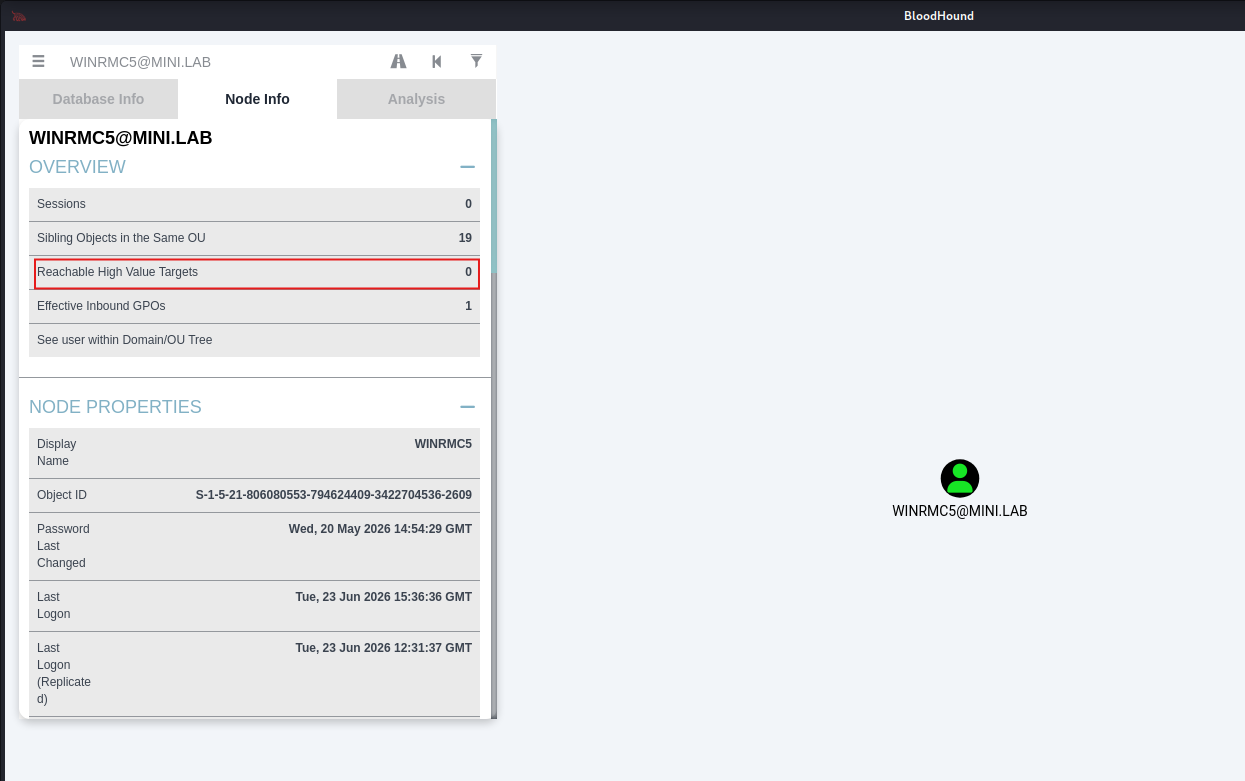 No CanPSRemote edge
Run MovementHound:
1
2
3
4
5
6
7
8
9
10
11
PS C:\tmp> Invoke-MovementHound -p wsman -bloodhound
[BH] Attacker node : WINRMC5@MINI.LAB (S-1-5-21-806080553-794624409-3422704536-2609)
[+] dc.mini.lab - Local Admin access via WinRM/WSMAN

[BH] Building BloodHound Legacy output...
[BH] ZIP saved : C:\tmp\MovementHound_BH_20260623_084015.zip
[BH] Attacker  : WINRMC5@MINI.LAB (S-1-5-21-806080553-794624409-3422704536-2609)
[BH] Edges     : 1  Computers: 1
[BH] Edge map  :
       WINRMC5@MINI.LAB                              --[CanPSRemote   (WinRM/CIM)]--> dc.mini.lab
[BH] Drag-and-drop the ZIP into BloodHound Legacy to import.
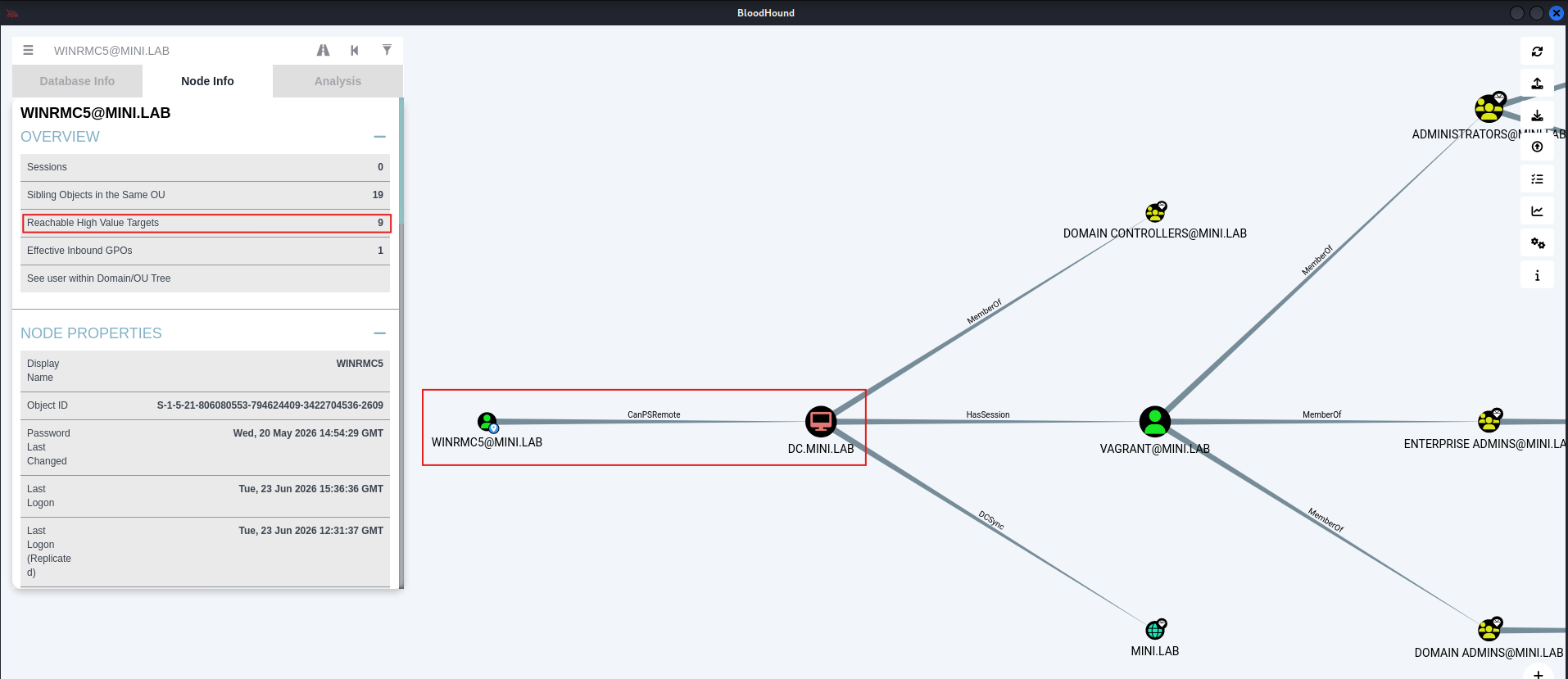 CanPSRemote edge
What's next
It’s time to open this up to the community, which can only help improve the tool. I’m not a fan of reinventing the wheel, so I’m happy to integrate new techniques into MovementHound, as I’ve already done.
That said, this tool was born out of real world assessment needs, and for that reason I’ll keep updating it. Below is a small to‑do list, in no particular order:
1
2
3
4
5
6
7
8
9
10
11
12
13
14
15
16
1. Python implementation (mainly to leverage broad libraries like Impacket) with Unix‑like compatibility.

2. OPSEC mode (avoiding active enumeration and preferring RPC over TCP/IP instead of named pipes over SMB).

3. Session 0 support for RDP and RDP shadowing by implementing raw network protocols.

4. Additional registry based techniques (sticky keys, RDP shadowing keys, LocalServer32, etc.).

5. Performance optimizations for faster execution (e.g., using winreg status checks to avoid unnecessary RR scans).

6. Legacy support for older systems using shadow.exe for RDP shadowing.

7. Accurate RDP access detection, distinguishing authentication success (NLA/CredSSP OK) from actual authorization (ability to obtain an interactive session).

8. Credential support via parameters.
Conclusion
There is no universal tool or one size fits all approach; the right choice always depends on the needs of the moment. As we’ve seen, each method comes with its own advantages and drawbacks, and combining them can lead to interesting results. If you need OPSEC and speed, this tool is probably not the right fit at the moment (a future update may introduce a focused switch). If you prioritize reliability over stealth and don’t mind a slower or noisier approach, then it might be worth a look.
Also, I suggest reading the previous posts related to this topic, but if you don’t want to dive into the technical details, I’ll leave you with the conclusion:
Although the configuration we discussed is not the default, Windows bases most of its access control on DACLs, and in a real engagement we cannot simply assume that default configurations have been left as is for at least two reasons:
- Misconfigured systems are surprisingly common in real world environments, as I personally observed during a live engagement. As environments pass through the hands of multiple IT administrators over time, misconfigurations steadily accumulate, forgotten loose ends, changes made by mistake, or fixes for problems like “How can a non-admin user start a service?”. And it isn’t only people: third party software is just as prolific a source, silently rewriting security descriptors at install time so its non-admin service accounts can function, and routinely granting more than strictly needed.
- Previously breached environment: As we have seen, the minimal privileges required for many of these techniques can also be leveraged to achieve persistence. During an engagement, we should therefore be able to verify whether such persistence mechanisms were used in a previous breach the company experienced.
So if you have valid credentials for a user who isn’t part of the Administrators group, or you lack access to readable/writable shares, it’s always worth investigating further.
A special thanks to Nikhil Mittal (@samratashok) for his research and for the tools of his that I have integrated into this project.